
Duplicate expense controls
Spot possible duplicate claims before reimbursement
Reimgo checks repeated receipt files and matching expense details to help your team find claims that may have been entered twice. Employees review matches against their own expenses before submitting, and approvers and finance also see potential matches across employees after submission.
7-day free trial. No card needed. Cancel anytime.
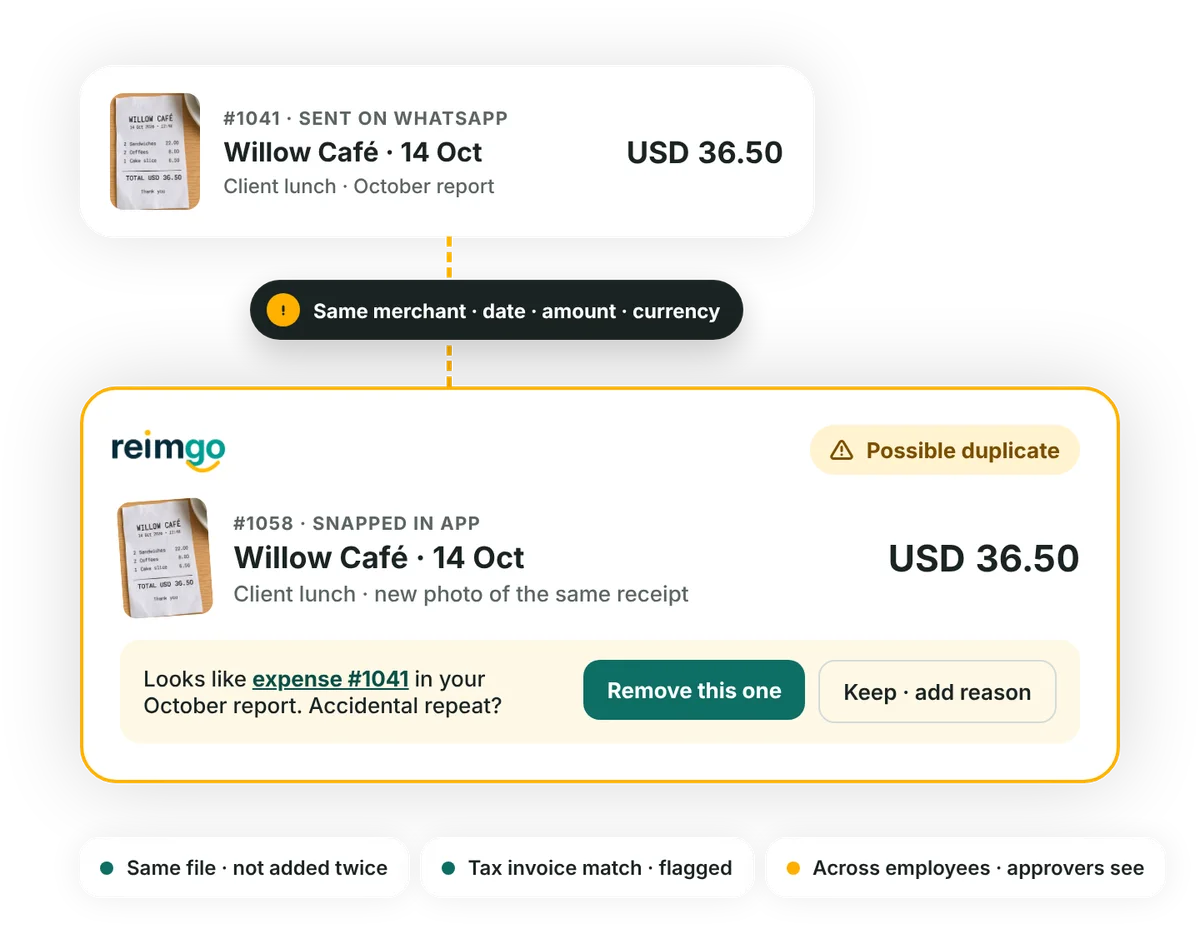
Check for duplicates at capture, submission and review
- Prevent the same file being added twiceIf a receipt file is already attached to one of an employee's expenses, Reimgo does not add it again and opens the expense that has it. This applies to uploads through the app, WhatsApp and email.
- Compare expense details when savedReimgo looks for matching expenses belonging to the same employee, using the tax invoice details or the merchant, date, amount and currency.
- Help employees review the matchA possible duplicate appears on the expense with a link to the matching one, so the employee can check whether it is an accidental repeat and remove the extra entry. When the duplicate policy warns, they give a reason to submit, and the warning and reason stay with the report for the approver.
- Check for matches across employeesAfter submission, approvers and finance see potential matches involving other employees in the company. Employees are not shown one another's claims.
What Reimgo compares
Checks extend across the employee's reports, so repeats are found even when they were entered in different reports.
| Check | What it looks for | What happens |
|---|---|---|
| Identical receipt file | The same file already attached to the employee's expenses. | The repeated file is not added again. |
| Tax invoice details | Matching supplier tax number, invoice number, date and total. | The expense is flagged as a possible duplicate. |
| Expense details | Matching merchant, date, amount and currency. | The expense is flagged as a possible duplicate. |
Give reviewers useful signals, with room for legitimate claims
Recognize variations in merchant names
Matching ignores differences in capitalization, punctuation and extra spaces, so "Willow Café" and "WILLOW-CAFÉ" count as the same merchant.
Choose whether to warn or block
The default duplicate policy warns. Set the rule to block to stop submission while a duplicate issue is unresolved.
Keep shared bills reviewable
Two colleagues may each claim their share of one bill. Matches across employees are flagged for approvers and finance to look into; they do not block submission on their own.
Keep the decision with your team
A matching amount and merchant do not prove an expense is wrong. Employees and approvers review the receipt, the explanation and the circumstances before deciding.
A receipt uploaded twice, without a second expense
An employee sends a café receipt to Reimgo through WhatsApp, then later uploads the identical file from their phone. Reimgo recognizes that the file already belongs to one of their expenses and takes them to the existing expense instead of adding it again.
If they take a new photo of the same paper receipt, it is a different file. Reimgo can still flag a possible duplicate when the invoice or expense details it reads match the existing claim.
Questions about duplicate expense detection
How does Reimgo detect duplicate expenses?
It checks for identical receipt files, matching tax invoice details, and matching merchant, date, amount and currency. It stops the same file being uploaded twice for the same employee and flags possible duplicate claims for review.
Does it check across different expense reports?
Yes. Matching covers the employee's other reports, not only the report being prepared.
Does it compare claims across employees?
Yes, for approvers and finance. After submission they see potential matches involving other employees in the company. Employees cannot see one another's claims, and cross-employee flags do not block submission on their own.
Does Reimgo compare what receipt photos look like?
No. It recognizes identical files rather than comparing different images. A new photo of the same receipt can still be flagged when the invoice or expense details it reads match an existing claim.
What happens if an amount differs because of a tip?
Then the amount-based checks do not match them. Matching is exact on the amount, so genuinely separate purchases are not flagged.
Can we block duplicate claims?
Yes. A duplicate policy set to block stops submission until the issue is resolved. A warning policy lets the employee explain for the approver. Cross-employee flags stay as review warnings.
What if two legitimate purchases have the same details?
Review the receipts and circumstances. Under a warning policy the employee explains why the expenses are separate. A duplicate flag points to a possible issue; it does not decide that the claim is invalid.
Check for repeat claims before they reach payroll
Start your free trial and see how Reimgo handles repeated receipt uploads and flags matching expenses for review.