
Payment approval controls
Review reimbursement batches before they reach payroll
Give finance a second review before a reimbursement file is released. Reimgo turns on second-person release by default, checks recently changed bank details and asks for a fresh authenticator code at release. The released file and everything done to it stay on record.
7-day free trial. No card needed. Cancel anytime.
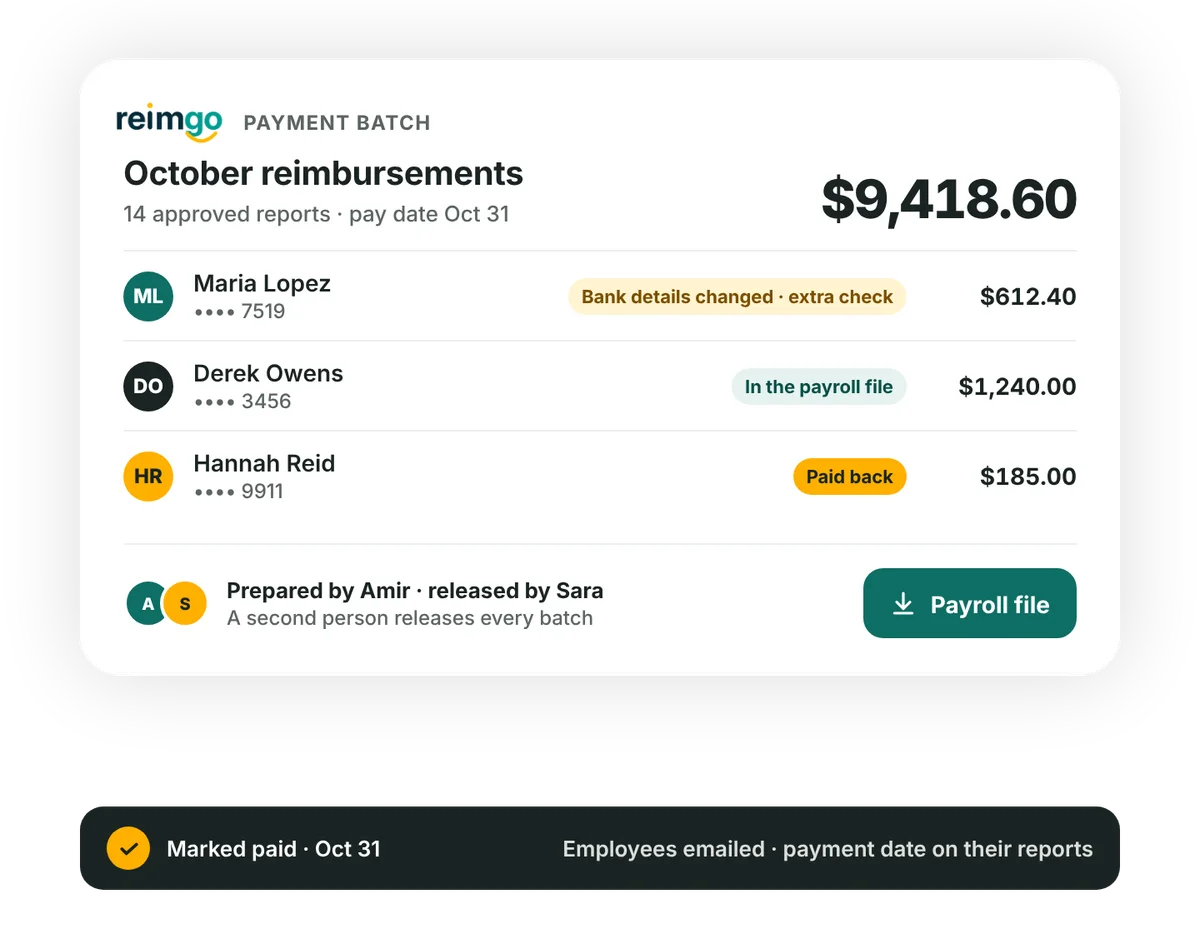
From approved reports to a released payroll file
An approved expense report is the starting point. Batch release adds a separate check before finance exports the reimbursement details. Reimgo prepares the file and records the payment status; your business makes the payment through its payroll or bank.
- Prepare the batchFinance selects approved reports and chooses a payment date. Reimgo marks lines with missing or recently changed bank details for attention.
- Check held payment linesAnother finance user checks the bank details with the employee and confirms the held line with an authenticator code. Lines still held are left out when the batch is released.
- Review and releaseThe releasing finance user completes the checks and enters a fresh authenticator code. Reimgo creates the payroll file and keeps that version.
- Pay through your existing processFinance downloads the file for payroll. After your business makes the payment, finance marks the batch paid and records the payment reference.
Controls between approval and payment preparation
A second person reviews the batch
By default, the finance user who prepares a batch cannot release it. A second finance user releases it with a fresh authenticator code.
Nobody releases their own reimbursement
A user cannot release a batch that pays them, or confirm a held line in it. This stays in force even when the second-person rule is switched off.
Changed bank details need confirmation
If an employee's bank account changed in the previous 14 days, their line is held until another person checks with the employee and confirms it. Reimgo checks again at release, and unconfirmed lines are left out of the file.
The released file is the reference
Reimgo creates the payroll file at release and keeps that version in encrypted storage with a digital fingerprint. Downloading it again needs a reason, and the download is recorded.
Exceptions are recorded
An admin can switch off the second-person rule for a very small team. Each batch released without a second person records that exception, and the self-payment block still applies.
Every batch has a history
Preparation, release, holds, confirmations, removals, cancellations, downloads and recorded payments appear in the audit trail with the user, time and IP address.
Check changed bank details before including a reimbursement
An employee updates their bank account shortly before the next reimbursement run. When finance prepares the batch, Reimgo holds that employee's payment line. A second finance user checks the new details with the employee and confirms the line. If it is still unconfirmed at release, it is left out of the file.
The batch history records the hold and the confirmation, so finance can see what was checked before release.
Questions about payment approval controls
What are reimbursement payment approval controls?
Checks applied when preparing and releasing employee reimbursement batches. In Reimgo they include second-person release by default, a block on releasing your own reimbursement, checks on changed bank details and a record of the released payroll file.
How is batch release different from expense approval?
Expense approval reviews the claim and its supporting documents. Batch release reviews the reimbursement batch before its payroll file is created. Your business then makes the payment through payroll or its bank.
We have one finance person. Can we still use batches?
Yes. An admin can switch off the second-person rule, and each affected batch records that exception. The finance user still cannot release a batch that includes their own reimbursement; another finance user is needed for that batch.
Does a bank-detail change mean waiting 14 days for payment?
Not necessarily. Reimgo checks whether the account changed in the previous 14 days. A second person can check the details with the employee and confirm the held line before release.
Can we shorten the bank-change checking window?
No. The 14-day window is fixed.
What happens to a held line that nobody confirms?
It is left out of the released payroll file. It is not treated as cleared just because the rest of the batch is ready.
Who can see full bank account numbers?
Only finance users, one account at a time, and each reveal is recorded in the audit trail. Everyone else sees the last four digits.
What if we find an error after releasing a batch?
Before the file is downloaded, finance can cancel the batch: its reports go back to Ready to pay for a new batch, and the cancelled batch stays in the record. After the download a batch cannot be cancelled in Reimgo, and a payment that comes back is recorded against the person.
Does Reimgo prevent changes to a downloaded payroll file?
Reimgo keeps the released version and records every download. A downloaded CSV can still be edited outside Reimgo, so your payroll process should use and check the released version.
Put a review step before your next payroll export
Start your free trial and see how finance prepares, checks and releases a reimbursement batch.