
AI-assisted expense management for UK businesses
From WhatsApp receipt to reimbursement, built for UK businesses.
Employees send receipts on WhatsApp, by email or through the app. Reimgo prepares the draft expenses, managers approve with the receipts attached, and finance gets a reimbursement file, VAT details and records for the accounts.
7-day free trial. No credit card required. WhatsApp capture included in every plan.
Capture expenses while the receipt is still in hand
Train tickets, overnight stays, parking and supplies bought for a job. Give employees a simple way to record what they spent, wherever they are working.
Send receipts on WhatsApp
Link a number once, then send a receipt photo or PDF. Reimgo replies in the chat and saves a draft expense.
Forward receipts by email
Forward an emailed receipt, such as a train ticket, from your registered email address. Reimgo creates a draft with the receipt attached.
Photograph or upload in the app
Take a photo or upload a file. Reimgo reads the supplier, date, amount, VAT and currency, and suggests a category from your company's list.
Check before submitting
Employees review the details, add the business purpose and choose a project or cost centre. Possible duplicates are flagged for review.
From a client rollout in Manchester to reimbursement: an example
Olivia is an IT consultant at an IT services company in London, travelling to Manchester for a client's system rollout. Follow her expenses from receipt to reimbursement.
- Train journeyOlivia forwards her £86.40 train ticket receipt by email. Reimgo saves a draft expense with the receipt attached.
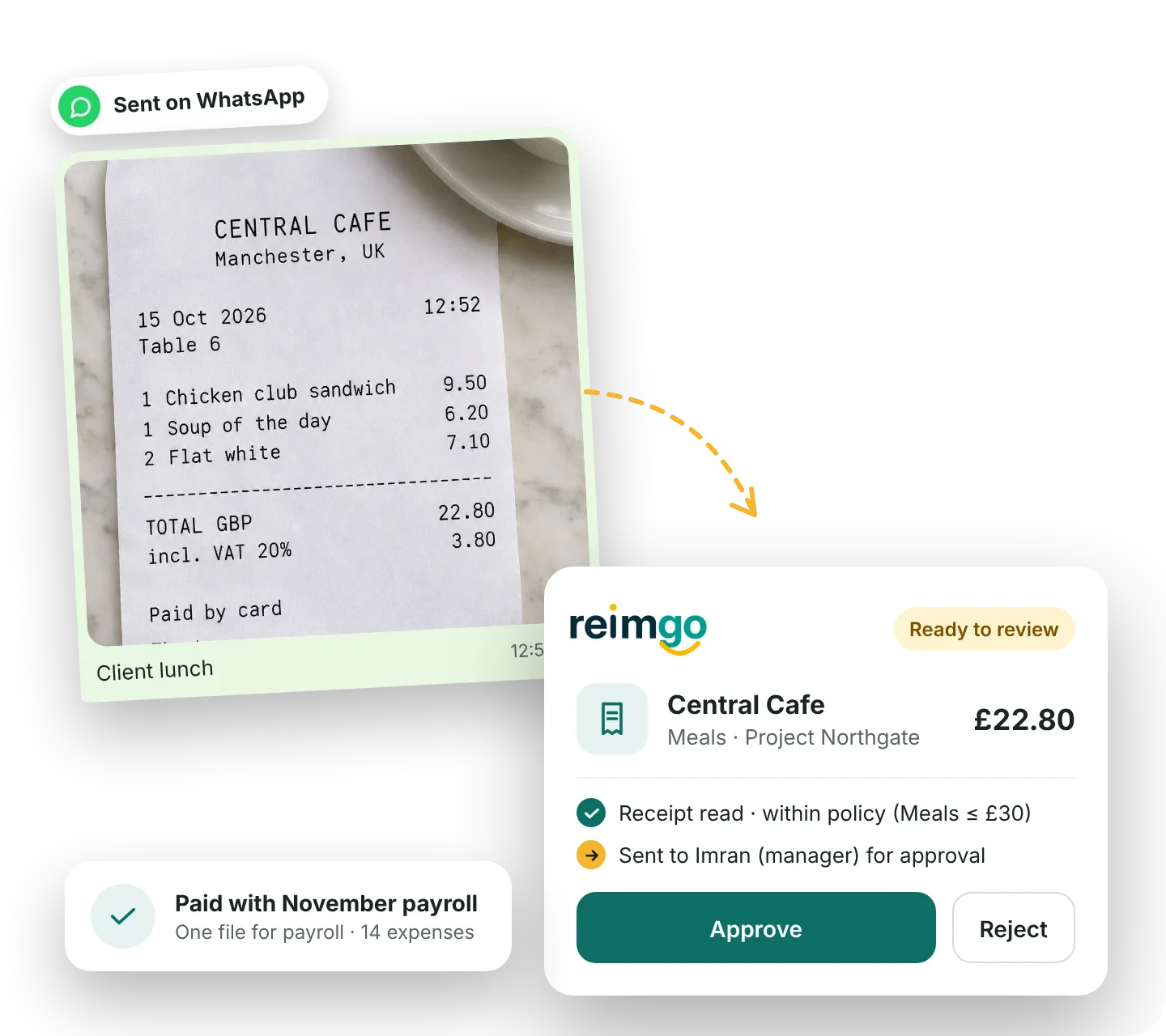
- Lunch breakShe pays £22.80 at Central Cafe and sends the receipt on WhatsApp before heading back to the client's office. Reimgo reads the total and the 20% VAT.
- Ready to submitOlivia checks the drafts, adds the purpose of the trip and selects the client's IT project, Project Northgate. She adds her taxi receipt from the station and submits one expense report.
- Reviewed with the receiptsHer manager, Imran, reviews the report and approves it. Finance then completes its checks, including the coding and any VAT details.
- Reimbursed and recordedFinance includes the approved report in a reimbursement batch, records the payment after payroll runs, and Olivia receives an email confirmation.
Illustrative example.
Expense management features for UK businesses
How Reimgo fits the way UK companies work. Each card opens the full feature page.
Policies in pounds
Set spending limits in GBP, with different caps by city if a night in London costs more than one in Leeds. Require receipts, explanations and submission within your deadline.
Expense policiesFlag possible duplicate claims
A train ticket forwarded by email and photographed again, or the same supplier, date and amount twice, is flagged before approval. Warn by default, or block.
Duplicate expense controlsBuilt for teams on the move
Site visits, client meetings and trips across the UK or abroad: staff capture the receipt on their phone when they pay.
Mobile expense captureProjects and cost centres
Code each expense to a client project or cost centre, and split a shared expense by amount or percentage.
Project and cost center trackingSpending in pounds, wherever it happened
A hotel in Paris or a taxi in New York is recorded in its own currency and reported in GBP, by category, project, cost centre or month.
ReportingAccess and audit trail
Employees see their own expenses and approvers see the reports routed to them. Admins and finance use two-factor sign-in, and approval and payment actions are recorded.
Audit trailsApprove expense claims with the details attached
Apply your expense policy before submission
Set spending limits, receipt requirements, submission deadlines and required explanations. A rule can warn the employee or stop submission until the issue is resolved.
Route reports to the right person
Send reports through managers, department heads, cost centre owners or named approvers. Finance reviews last.
Keep reports moving
Reminders, escalation and temporary delegation keep approvals going when someone is busy or away.
Keep a record of each decision
The report keeps its receipts, explanations and approval history, so finance can see what was reviewed and who approved it.
Prepare reimbursements for your payroll or bank
Finance groups approved reports into a batch for the payment date. Reimgo prepares the file and keeps the reimbursement record; your payroll provider or bank makes the payment.
A file for payroll
Export reimbursement amounts as a standard CSV, matched to each employee's payroll reference, for import into your payroll process. Confirm the column mapping and pay item with your payroll provider before the first run.
A Bacs Standard 18 file
For batches in pounds, Reimgo can produce a Bacs Standard 18 file using your Bacs Service User Number and each employee's sort code and account number. Your bank or Bacs bureau submits it; check it accepts the file before you rely on it.
A second review before release
By default, the person who prepares a batch cannot release it. A second person releases it with a fresh authenticator code, and nobody can release a batch that pays themselves.
Bank details handled carefully
Sort codes and account numbers are encrypted, and a payment line is held when an employee's bank details changed in the last 14 days, until a second person confirms it.
A clear payment status
After payment, finance records the date and reference. Employees see that their report has been reimbursed and receive an email confirmation.
Mileage at the HMRC approved rate
Type the miles, get the amount
Employees enter the business miles driven and Reimgo calculates the amount at the HMRC approved mileage rate of 45p a mile for cars and vans.
Rates that follow the date
The HMRC rate for the first 10,000 business miles is set up for you. Your admin can add company rates. Reimgo does not switch to the 25p rate after 10,000 miles automatically, so check annual totals with payroll.
On the same report
Mileage sits beside receipts on the expense report, with the same approvals and reimbursement. There is no GPS tracking.
Keep UK VAT details with the receipt
Record what the receipt shows
Each expense keeps its tax code, the VAT amount and the supplier's VAT number with the original receipt. Employees check the draft before submitting it.
Checks as each receipt is read
Reimgo flags a VAT number that is not in the UK format and a VAT amount that does not match the rate, so the employee can fix it before submitting.
A VAT report that shows what needs attention
The VAT report marks expenses over £250 that have no supplier VAT number, because a full VAT invoice is needed above that amount, so finance can ask for one.
Exports for your accountant
Download expense lines with category codes, projects, cost centres, currencies and tax details as CSV or Excel. Each report can also be downloaded as a PDF with its receipts.
Recording VAT is different from deciding whether it can be reclaimed. HMRC's rules depend on the type and purpose of the expense; VAT on business entertainment, for example, is generally blocked.
Connect your accounting software
Export the records on either plan
Download expense and report data as CSV or Excel, with the codes your accountant uses. A QuickBooks Online journal import file is also available.
Connect your accounts with Reimgo Connect
Connect Xero, QuickBooks Online or Zoho Books to bring in your chart of accounts and tax codes, post approved expenses and record reimbursement payments.
Set up for UK teams
Choose the United Kingdom when you sign up and Reimgo starts with these settings. Your admin can change them.
Pounds and other currencies
GBP is your company currency. Overseas expenses are recorded in the currency on the receipt and converted.
UK VAT codes
A 20% standard rate, a zero-rated code and an exempt code are set up for you. Your admin can adjust the codes and which categories use them.
A financial year from April
Reports and spending views follow a financial year that starts in April, and dates are read day first, the UK way.
Two plans, priced per claiming user
| Reimgo | Reimgo Connect | |
|---|---|---|
| Monthly price | $4 per claiming user | $7 per claiming user |
| WhatsApp receipt capture, policies and approvals | Included | Included |
| Reimbursement batches, Bacs and payroll files, VAT report | Included | Included |
| Live Xero, QuickBooks Online or Zoho Books connection | Not included | Included |
People who only approve, manage reimbursements, administer the account or review records are free. Your company still records expenses and reports spending in pounds. There is no setup fee, and yearly billing is also available.
Questions UK businesses ask
Can employees submit receipts through WhatsApp?
Yes. Each employee links their number once, then sends receipt photos or PDFs to Reimgo. Reimgo replies in the chat and saves drafts for review. WhatsApp capture is included in both plans.
Can we manage expenses in pounds and other currencies?
Yes. GBP is your company currency, and overseas expenses are recorded in the currency on the receipt. Each expense shows the original amount and its conversion into pounds.
Can we reimburse employees through payroll?
Yes. Reimgo prepares a standard CSV reimbursement file for finance to import into payroll. Confirm the layout, pay item and tax treatment with your payroll provider. Reimgo does not run payroll or make the payment.
Does Reimgo make Bacs payments?
No. Reimgo can produce a Bacs Standard 18 file using your Bacs Service User Number, but your bank or Bacs bureau submits it and makes the payment. Confirm compatibility before relying on the file.
Does Reimgo handle HMRC mileage rates?
Reimgo applies the HMRC approved mileage rate of 45p a mile for cars and vans, for the first 10,000 business miles. It does not switch to the 25p rate automatically after 10,000 miles, so check annual totals with payroll.
Does Reimgo make our expense claims HMRC-compliant?
Software alone cannot establish compliance. Reimgo helps you collect evidence, apply your company rules and keep the approvals. Your business remains responsible for checking whether expenses qualify for the relevant tax treatment and reporting any that need it.
Does Reimgo calculate which VAT we can reclaim?
No. Reimgo records the tax code, VAT amount and supplier VAT number with each expense, flags what is missing, and includes the details in exports. Finance or your accountant decides whether the VAT can be reclaimed, and Reimgo does not submit VAT returns.
Does Reimgo connect to Xero?
Yes. Reimgo Connect supports a live Xero connection, as well as QuickBooks Online and Zoho Books. Both plans also provide file exports for your accountant.
Where is our data hosted?
In the United States, on Amazon Web Services, with a separate database for each company. UK personal data is transferred under the UK International Data Transfer Addendum; see the privacy policy.
What does it cost?
$4 per claiming user per month, or $7 on Reimgo Connect. People who only approve, manage reimbursements or review records are free. The free trial is 7 days, and no card is needed.
Guides for UK businesses
Reimbursing employee expenses in the UK
Claims, approvals, payroll and bank payments, with HMRC and VAT considerations.
Read moreUK VAT on employee expenses
What you can reclaim on meals, hotels and mileage, and the records to keep.
Read moreWriting an expense policy
What to include in a one-page policy.
Read moreTry Reimgo with your UK team
Invite your team, capture a receipt, approve an expense report and prepare a reimbursement batch for your next payment date.