
Reimbursements
Employee reimbursements, from approved report to payroll file
Bring approved expense reports into a payment batch, review the amounts and prepare the file for your payroll. Reimgo keeps the reports, receipts and payment history together, so finance can prepare reimbursements and employees can follow their claims. Your business makes the payment through its existing payroll or bank, and finance records it in Reimgo.
7-day free trial. No card needed. Cancel anytime.
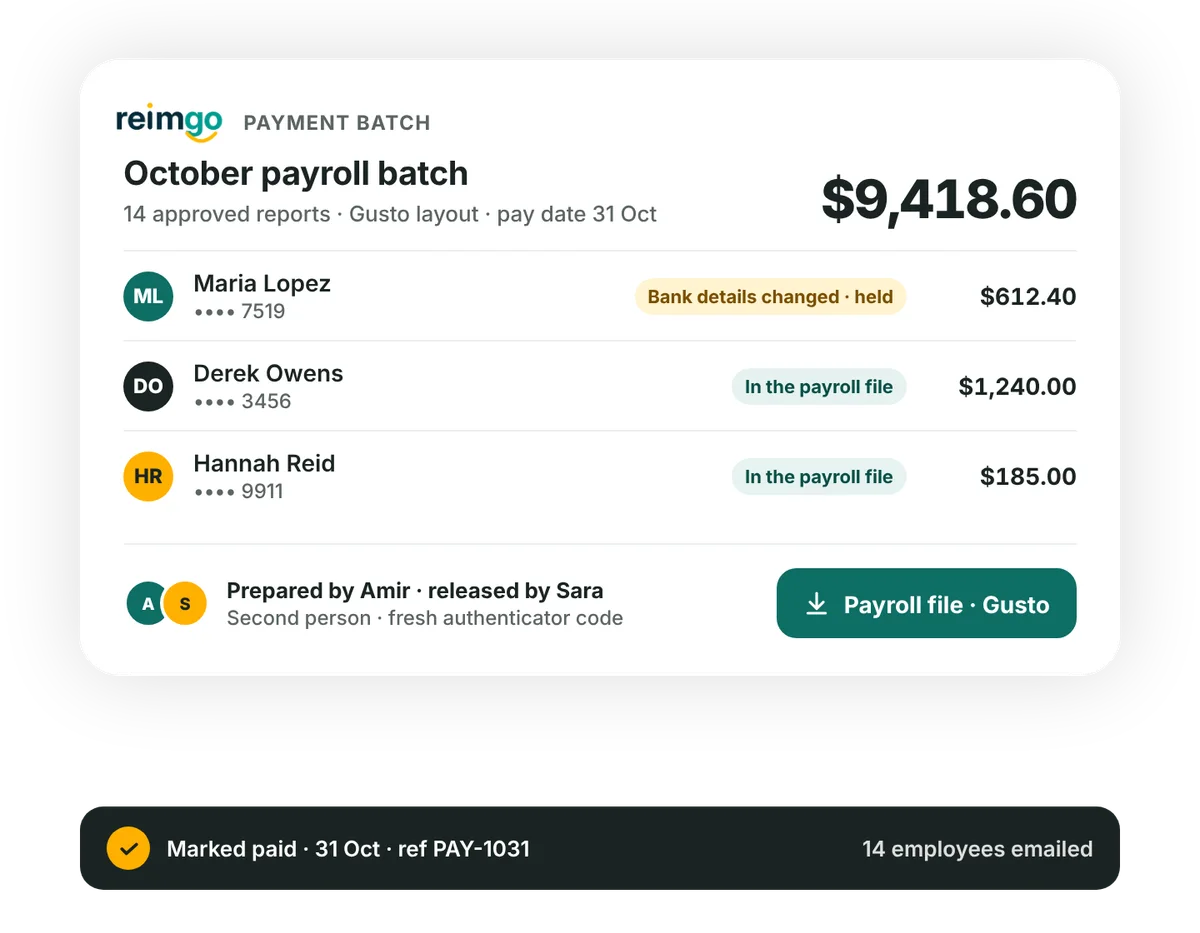
Prepare reimbursements without rebuilding a spreadsheet
Work from approved expense reports, with the amounts and employee details already in place.
- Group approved reports into a batchApproved reports appear in one list with the employee, the amount and whether bank details are on file. Choose the company, payment method and pay date, add the reports and review the batch total and each line.
- Check and release the batchBy default a second person releases the batch with a fresh authenticator code. Lines whose bank details changed recently are flagged and held until someone confirms them.
- Download the payroll fileReimgo creates the file at release and keeps that version. The first download marks the batch as sent; later downloads need a reason and are recorded.
- Record the paymentAfter your business makes the payment, mark the batch paid with its date and reference. Employees get an email and see the payment date and method on their reports.
Check reimbursement details before the file leaves finance
Separate preparation from release
By default one person prepares the batch and another releases it. An admin can turn this off for a smaller team, and releases made that way are recorded.
Nobody releases their own reimbursement
A batch that includes a payment to you must be released by someone else, even when the second-person rule is off.
Review recently changed bank details
If an employee's bank account changed in the last 14 days, their line is held until a second person confirms the change. Confirmation clears the hold; the employee does not have to wait 14 days.
Keep a record of the released file
Reimgo stores the released payroll file encrypted, with a digital fingerprint. Downloads and every batch action are recorded in the audit trail.
Use your existing payroll to reimburse employees
Download the reimbursement data in the Gusto or QuickBooks Payroll layout, or as a standard CSV. The file carries the employee identifier, the reimbursement amount, the currency, the pay date and a batch reference. Finance imports it into payroll as a reimbursement or additional-pay item.
Check the layout you choose against your payroll provider's import requirements. Reimgo supplies the file; it does not connect to payroll or move money.
Paying outside payroll? Your business can use another payment method and record the payment date and reference in Reimgo.
Keep bank details protected and payment records clear
Finance adds employees' bank details in Reimgo or imports them from a spreadsheet. Account numbers are encrypted and shown masked, and revealing a full number is limited to finance and recorded in the audit trail.
When reimbursements go through payroll, payroll pays from the bank details held in its own system. A change recorded in Reimgo must be made there as well.
What a monthly reimbursement run could look like
On October 25 a finance manager groups the approved reports of 14 employees into a $9,418.60 batch for the October 31 payroll. One employee changed their bank details the week before, so their line is held. The controller checks the change with the employee, confirms the line and releases the batch with an authenticator code.
Finance downloads the file and imports the amounts into payroll. After the October 31 pay run, the finance manager marks the batch paid in Reimgo. Fourteen employees get an email and can see the payment date and method on their reports.
Questions about employee reimbursements
Does Reimgo pay employees directly?
No. Reimgo prepares the reimbursement file and tracks the payment status. Your business pays through its payroll provider or bank, then finance records it in Reimgo. Reimgo does not hold funds or send bank payments.
Which payroll systems can we use?
Reimgo includes layouts for Gusto and QuickBooks Payroll, plus a standard CSV for other systems that import reimbursements or additional pay. Check your payroll provider's import requirements; finance downloads the file and imports it.
Can one finance person prepare and release a batch?
Not by default: preparation and release take two people. An admin can turn that off, and batches released that way record the exception. Nobody can release a batch containing their own reimbursement, so those batches still need another finance user.
Can we reimburse employees outside payroll?
Yes. Pay by any method your business uses, then record the payment date and reference in Reimgo. Reimgo records the reimbursement; it does not make the transfer.
Do employees get a payment notification?
Yes. When finance marks the batch paid, employees receive an email, and their reports show the payment date and method. Finance records this status; it is not confirmed automatically by the bank.
What if a report in a batch is wrong?
Before release, remove the line and its report returns to Ready to pay, or send the report back to the employee with a note. After release, finance can cancel the batch until its file is downloaded, and the reports return to Ready to pay. After the download, a later batch corrects it.
Get your next reimbursement run ready
Try Reimgo with your team's expenses. Review an approved report, prepare a payment batch and see how the payroll export fits your process.