
AI-assisted expense management for US businesses
From WhatsApp receipt to reimbursement, built for US businesses.
Employees send receipts on WhatsApp, by email or through the app. Reimgo reads the details, employees check their expenses, and managers approve with the receipts attached. Finance gets a reimbursement file for payroll and records for the books.
7-day free trial. No credit card required. WhatsApp capture included in every plan.
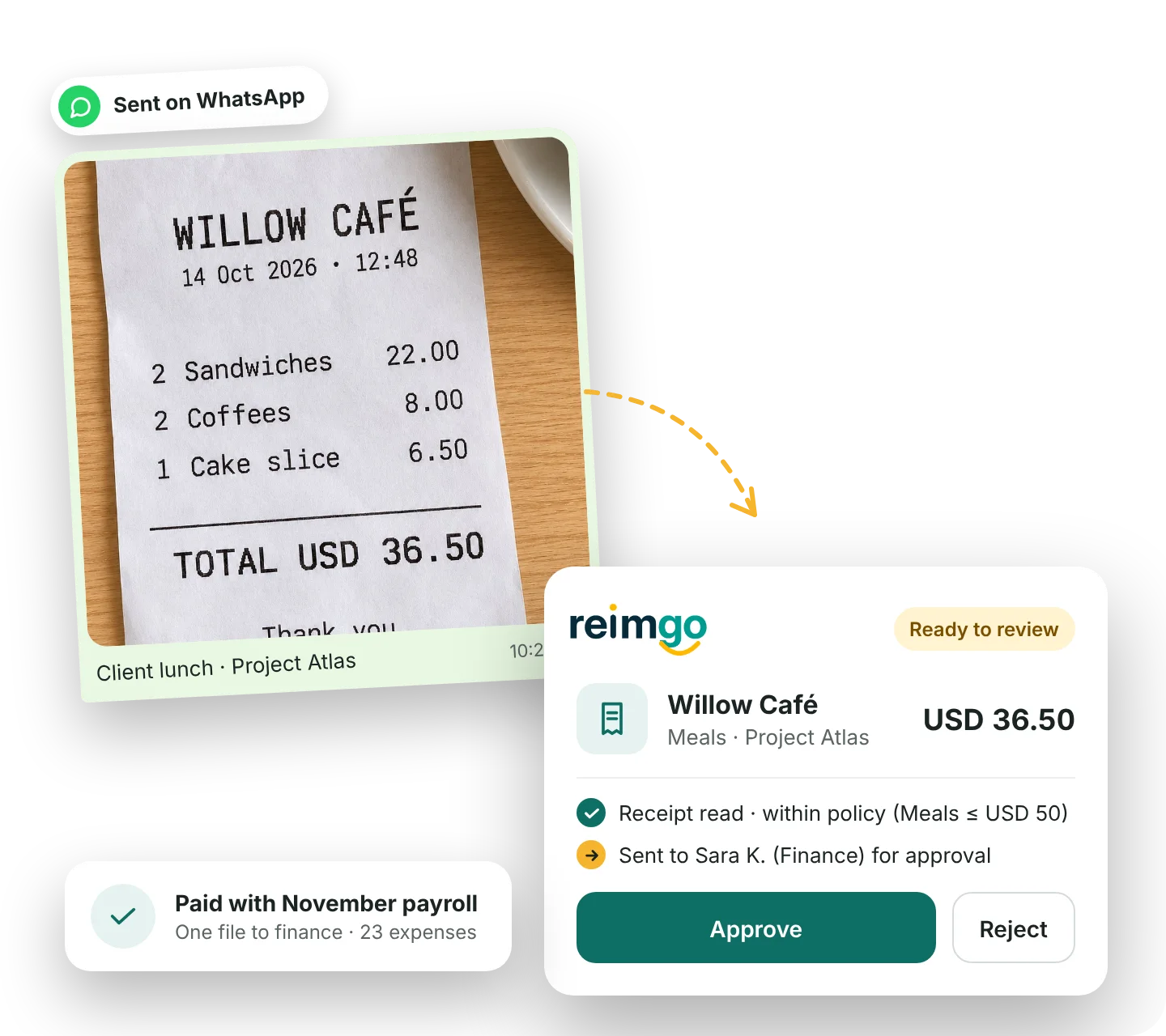
Capture receipts before they become month-end paperwork
A client lunch, a hotel stay or supplies bought on the way to a job. Employees record the expense while the receipt is still in their hand.
Send it on WhatsApp
Link a number once, then send a receipt photo or PDF. Reimgo replies in the chat and saves a draft expense.
Forward it by email
Forward an emailed receipt from your registered email address. Reimgo creates a draft with the receipt attached.
Snap it in the app
Photograph a receipt or upload a file. Reimgo reads the merchant, date, total, tax and currency, and suggests a category from your company's list.
Check before submitting
Employees review the details, add the business purpose and choose a project or cost center. Possible duplicates are flagged for review.
From a client lunch in Austin to reimbursement: an example
Maya is a field engineer visiting a client. Follow her expense from receipt to reimbursement.
- At lunchMaya pays $36.50 at Willow Café and sends the receipt on WhatsApp before leaving the restaurant.
- Ready to reviewReimgo saves a draft with the receipt attached. Maya checks the details, picks the client project and notes who attended and the business purpose.
- One report to submitShe groups the lunch with her other expenses for the visit, including her mileage, and submits the report. Any policy warnings appear before submission.
- Approved with the details attachedHer manager reviews the expenses and receipts on his phone. Finance makes the final check before including the report in a reimbursement batch.
- Paid through payrollFinance imports the reimbursement file into payroll. After payment, finance marks the batch paid in Reimgo, and Maya receives an email confirmation.
Illustrative example.
Expense management features for US businesses
How Reimgo fits the way US companies work. Each card opens the full feature page.
Categories that match your books
Use your own expense categories and codes, so finance receives consistently coded reports.
Expense trackingProjects and cost centers
Assign expenses to a client project or cost center, and split shared costs by amount or percentage.
Project and cost center trackingUSD reporting, including trips abroad
Record a foreign expense in its original currency and see the converted amount in US dollars.
Multi-currency expensesSpending you can explain
View spending by category, employee, project, cost center, company or month, then open the expenses behind the totals.
ReportingFlag possible duplicate claims
Duplicate checks help flag a repeated receipt, or an expense with the same merchant, date and amount, before approval.
Duplicate expense controlsAccess and audit trail
Employees see their own expenses, approvers see the reports routed to them, and approval and payment actions are recorded.
Audit trailsGive managers the details they need to approve
Check your expense policy before submission
Set spending limits, receipt requirements, submission deadlines and required notes. A rule can warn the employee or stop submission until the problem is resolved.
Send reports to the right approver
Route reports through managers, department heads, cost center owners or named approvers. Finance reviews last.
Keep approvals moving
Reminders, escalation and temporary delegation help reports move forward when an approver is busy or away.
Keep the decision with the report
Receipts, employee explanations and approval history stay together. Finance can see what was submitted and who approved it.
Reimburse through the payroll you already use
Finance groups approved reports into a batch for the payment date, releases it and downloads the reimbursement file. Your payroll makes the payment.
Payroll export options
Choose a Gusto layout, a QuickBooks Payroll layout or a standard CSV. The Gusto and QuickBooks Payroll layouts support USD batches. These are file exports, not live payroll connections, so confirm the layout and pay item against your provider's import requirements before your first run.
Review before release
By default a second person releases each batch with a fresh authenticator code. Nobody can release a batch that includes a payment to themselves.
A consistent payment record
The file is fixed when the batch is released. After payroll runs, finance records the payment date and reference, and employees see the updated status.
Mileage at the IRS standard rate
Type the miles, get the amount
Employees enter the distance driven for work and Reimgo calculates the amount at the IRS standard mileage rate for the date of the trip.
Rates that follow the date
The IRS rate is set up for you, including a rate change during the year. Your admin can add later rates or your own company rates.
On the same report
Mileage sits beside receipts on the expense report, with the same approvals and reimbursement. There is no GPS tracking.
Keep the records behind each reimbursement
For US businesses using an accountable plan, IRS rules look for a business connection, timely substantiation of expenses and the return of excess reimbursements or advances within a reasonable period. Reimgo helps organize the supporting records.
Receipts and business purpose
Keep the receipt, the expense details and the employee's explanation together. Require notes for categories where finance needs more context.
Approval history
See who submitted, approved or returned a report, with the dates and notes.
Reimbursement records
Keep each report linked to its reimbursement batch and the recorded payment details.
Files for your accountant
Export expense lines and reports to CSV or Excel. Download a report PDF with the receipts attached.
Connect your accounting software
Export the records on either plan
Download CSV and Excel files with category, project and cost center codes, amounts, currencies and tax details. A QuickBooks Online journal import file is also available.
Connect your books with Reimgo Connect
Connect QuickBooks Online, Xero or Zoho Books to bring in your chart of accounts and tax codes, post approved expenses and record reimbursement payments.
Set up for US teams
Choose the United States when you sign up and Reimgo starts with these settings. Your admin can change them.
US dollars and foreign currencies
USD is your company currency. Expenses from trips abroad are recorded in the currency on the receipt and converted.
Reads US receipts the US way
Dates are read month first, and sales tax and tip are read separately from the total, so a restaurant bill is not counted twice.
US calendar and time zones
A financial year from January and your own time zone, so dates and deadlines match your working day. US federal holidays are set up, and an expense dated on one is flagged for the reviewer.
Two plans, priced per claiming user
| Reimgo | Reimgo Connect | |
|---|---|---|
| Monthly price | $4 per claiming user | $7 per claiming user |
| Receipt capture, approvals and reimbursement batches | Included | Included |
| Payroll files and accounting exports | Included | Included |
| Live QuickBooks Online, Xero or Zoho Books connection | Not included | Included |
People who only approve, manage reimbursements, administer the account or review records are free. There is no setup fee, and yearly billing is also available.
Reimgo hosts customer data in the United States.
Compare plans and billing optionsRead about security at Reimgo
Questions US companies ask
How does Reimgo handle employee expenses?
Employees capture receipts, review the draft expenses and submit a report. Managers approve with receipts and policy warnings attached. Finance reviews the report, prepares a reimbursement batch and exports the payroll file.
Can employees send receipts on WhatsApp?
Yes. Each employee links their number once, then sends receipt photos or PDFs to Reimgo. Reimgo replies in the chat and saves draft expenses for review. WhatsApp capture is included in both plans.
Does Reimgo work with Gusto or QuickBooks Payroll?
Reimgo provides export layouts for Gusto and QuickBooks Payroll for USD batches, plus a standard CSV. Finance downloads and imports the file. Check the first export against your payroll provider's requirements; there is no live payroll connection.
Does Reimgo send reimbursements by ACH?
No. Reimgo prepares the reimbursement file and tracks the payment status. It does not hold funds, initiate ACH transfers or move money. Your payroll provider or bank makes the payment, and finance updates the status in Reimgo afterward.
Can employees claim mileage at the IRS rate?
Yes. Employees type the miles driven and Reimgo applies the IRS standard mileage rate for the date of the trip. Your admin can add company rates. There is no GPS tracking.
How does Reimgo treat sales tax?
Reimgo reads the sales tax from the receipt and records it as part of the expense, separately from any tip. It is included in the amount reimbursed and in your exports.
Can Reimgo support our accountable-plan records?
Reimgo keeps receipts, business-purpose notes, approvals and reimbursement records together, and those records can support your process. Your accountant determines the tax treatment and whether your arrangements meet the accountable-plan requirements, including how excess advances are returned. Using Reimgo does not establish an accountable plan.
Does Reimgo connect to our accounting system?
Reimgo Connect supports live connections to QuickBooks Online, Xero and Zoho Books. Both plans include CSV and Excel exports, report PDFs and the QuickBooks Online journal import file.
Can we handle expenses from trips abroad?
Yes. Expenses can be recorded in the currency on the receipt and converted to your company currency. The original and converted amounts both stay visible.
What does it cost?
$4 per claiming user per month, or $7 on Reimgo Connect. People who only approve, manage reimbursements or review records are free. The free trial is 7 days with up to five people, and no card is needed.
Guides for US companies
Reimbursing employee expenses in the US
Policy, receipts, approvals, payment timing, and federal and state rules.
Read moreAccountable plans
The IRS requirements, the 30/60/120-day rules and the records to keep.
Read moreSubstantiated expenses
What it means to substantiate a business expense, and the records to keep.
Read moreTry your next expense report in Reimgo
Start with up to five people. Send a receipt, review the draft, approve a report and prepare a reimbursement batch.