
How it works
From receipt to reimbursement. Here's how Reimgo works.
Employees send receipts through WhatsApp, email or the app. Reimgo turns them into draft expenses, managers review the submitted reports, and finance prepares reimbursements through your existing payroll process. Receipts, decisions and payment status stay connected, so your team has a clear view of every claim.
7-day free trial. No credit card required. WhatsApp capture included in every plan.
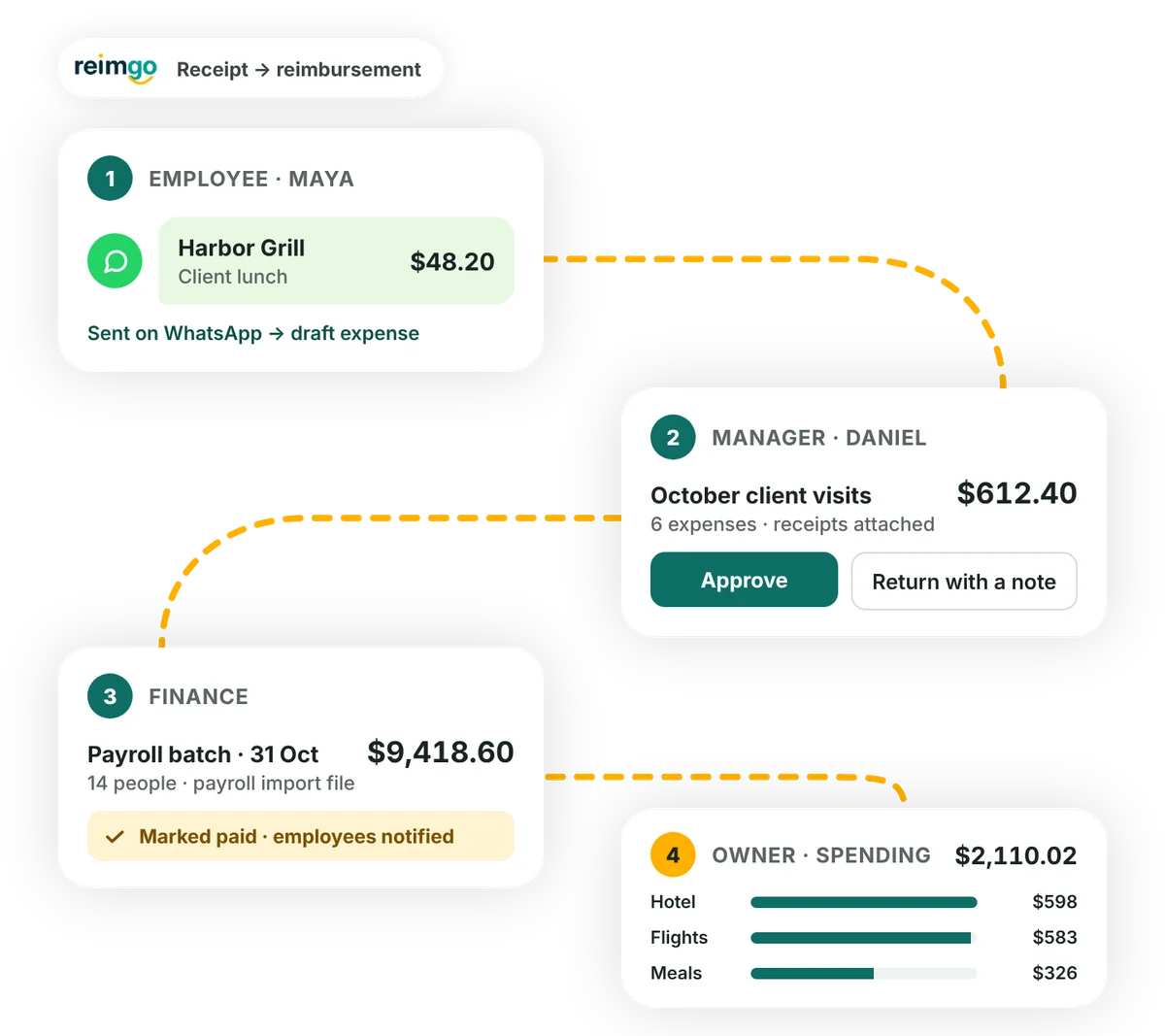
Watch it in 50 seconds
Follow one receipt from a WhatsApp photo to payroll: Maya sends it, her manager approves it, finance releases the batch and the owner sees the spending.
Employees: turn receipts into claims ready for review
Capture expenses as they happen and check the details before submitting a report.
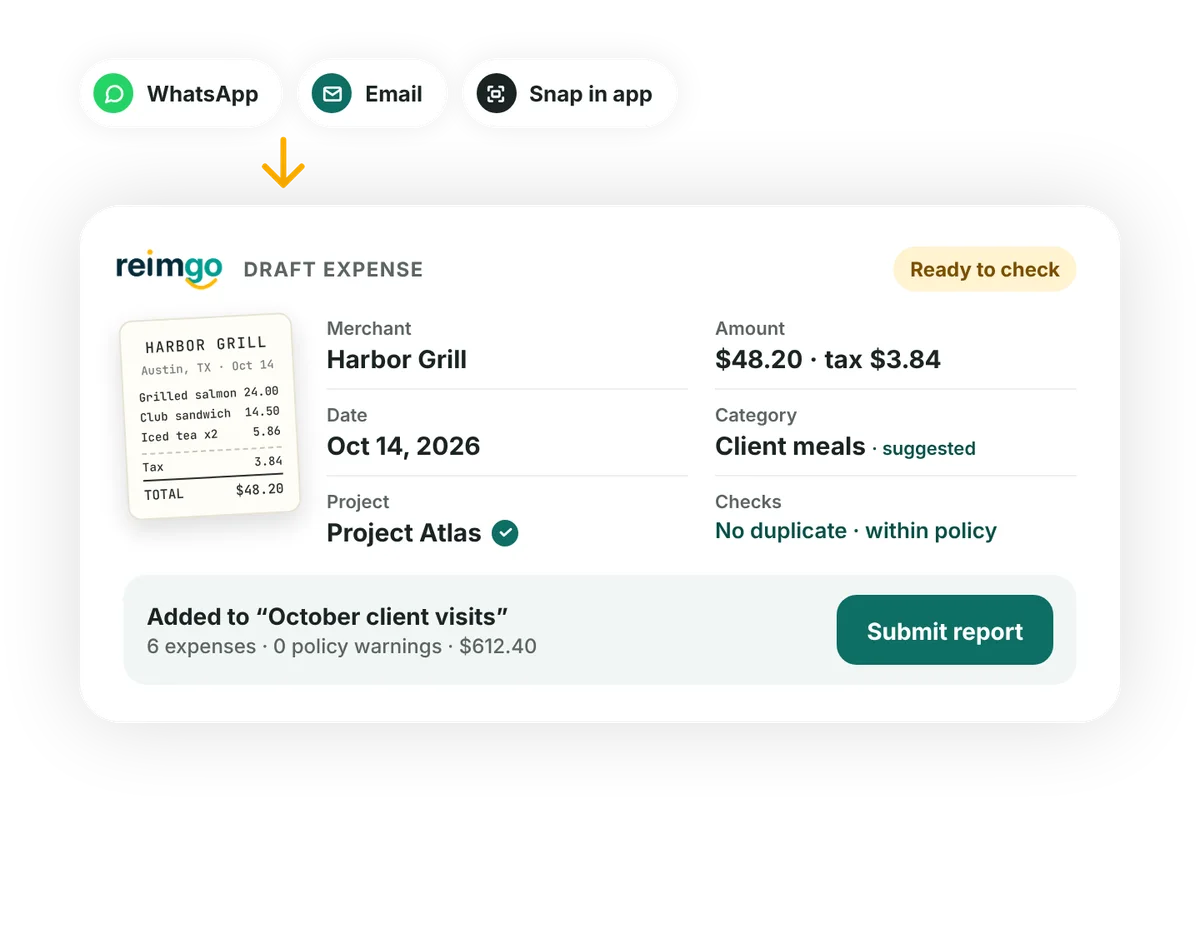
- Send a receipt your waySend a receipt photo or PDF through WhatsApp, forward an emailed receipt or take a photo in Reimgo. An existing file can be uploaded too.
- Start with the details filled inReimgo reads the merchant, date, amount, tax and currency, and suggests a category. The receipt stays attached to the draft expense.
- Check the expense and add contextReview the details, correct anything that needs changing and add a description, project or cost center. Possible duplicates are flagged for review.
- Submit a complete reportGroup expenses for a trip, a client or a month. Review the policy warnings, fix any issues and send the report for approval.
Managers: review claims with the details in front of you
Open a report on your phone or laptop, with its expenses, receipts and policy warnings together.
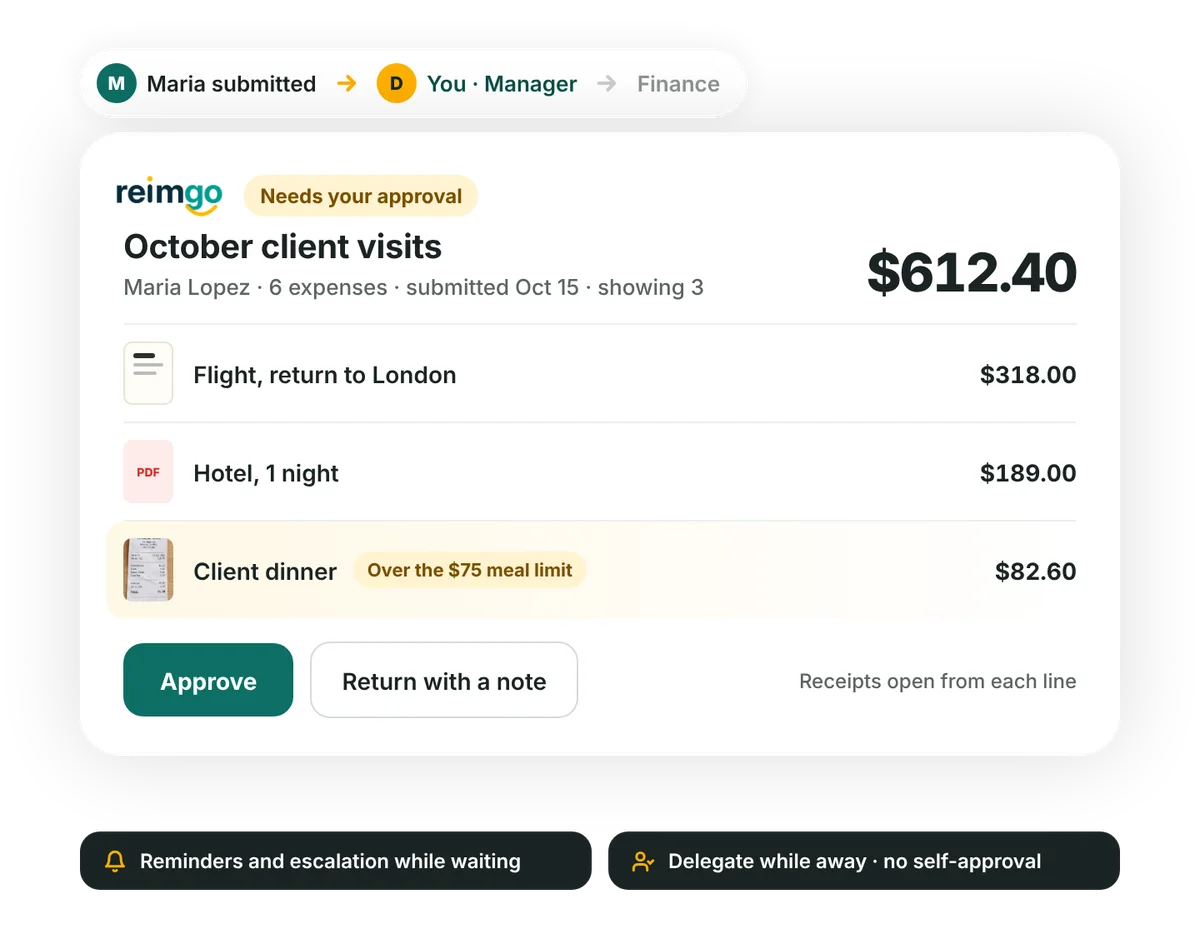
- Receive the reports you need to reviewReimgo routes reports according to your approval workflow. Steps can include managers, cost center owners, department heads, named people or roles, with finance reviewing last.
- Check the total and the supporting receiptsReview each expense beside its receipt and any policy warning, so you see the information behind the claim before deciding.
- Approve or ask for a correctionApprove the report or return it with a note explaining what needs changing. The employee corrects it and resubmits, with the history kept.
- Keep approvals moving during absencesReminders and escalation follow up on waiting reports, and approvers can delegate while they are away. By default nobody can approve their own report.
Finance: prepare approved claims for reimbursement
Bring approved reports into a payment batch and export the reimbursement details for your payroll process. Your business makes the payment through its payroll or bank.
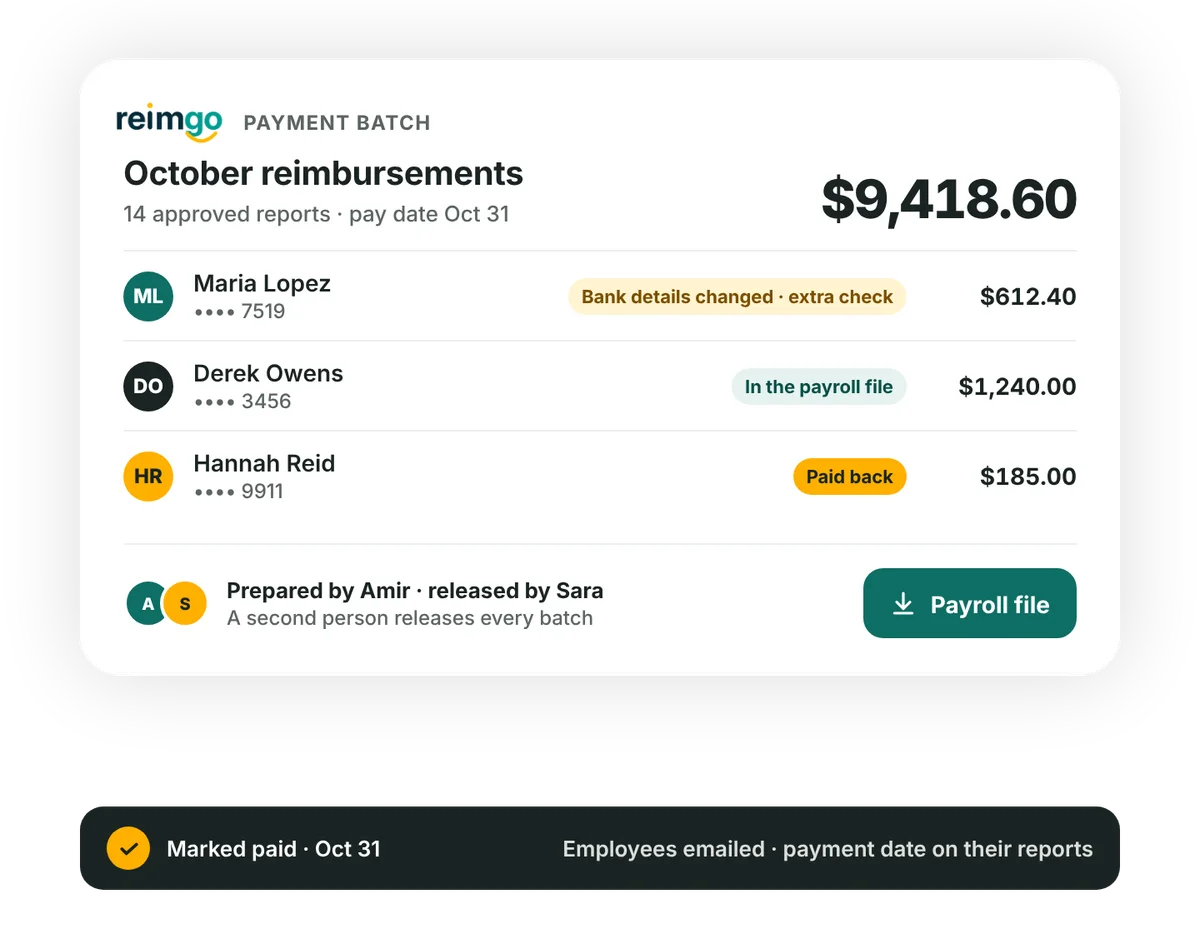
- Bring approved reports togetherAfter the required approvals and the finance review, select the reports ready for reimbursement and group them into a payment batch.
- Review and release the batchBy default a second person releases a batch prepared by someone else. Nobody can release a batch that includes their own reimbursement, and recently changed bank details get an extra check.
- Export the reimbursement fileDownload the payroll file in one of the available layouts. It carries the employee, the reimbursement amount and a reference for your payroll process.
- Record the payment and notify employeesAfter your business makes the payment, mark the batch paid in Reimgo. Employees see the recorded payment details on their reports and receive an email.
Business owners: understand where expense money goes
Review spending across your business and open the expenses behind the totals.
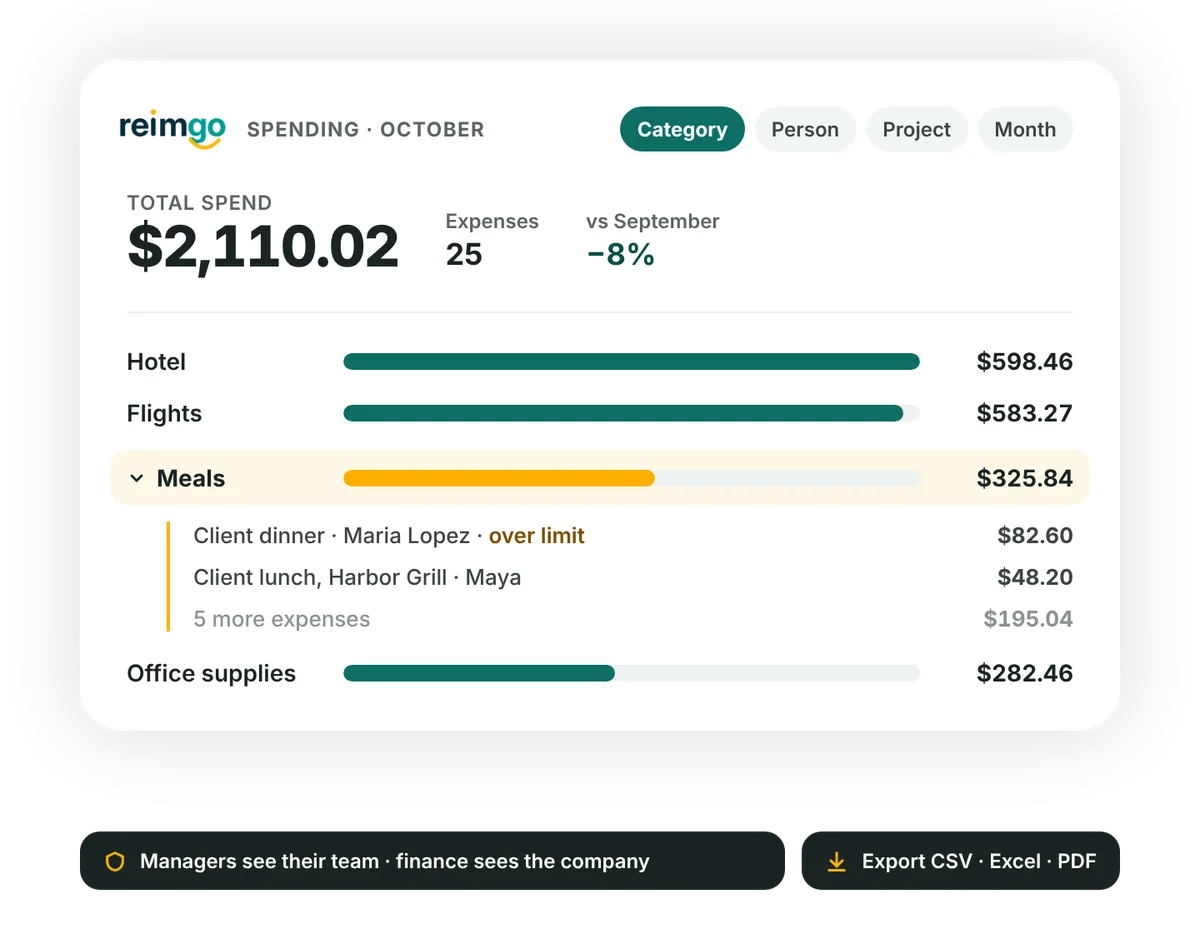
See spending by the areas that matter
Review expenses by category, employee, project, cost center, company or month, with the previous period beside it.
Look beyond the headline total
Choose the spending view you need, then open the individual expenses behind the figures.
Give each person the appropriate view
Managers see their team's spending. Finance and the company users you authorise see the wider view, according to their permissions.
Share the detail with your accountant
Export report and expense data to CSV or Excel, or download individual expense reports as PDFs.
Questions about how Reimgo works
How does Reimgo work?
Reimgo connects receipt capture, expense reports, approvals and reimbursement preparation. Employees capture receipts and check the draft expenses, approvers review submitted reports, and finance prepares payment batches and the payroll file. Your business makes the payment, then finance records it in Reimgo.
Can employees send receipts through WhatsApp?
Yes, on every plan. Employees link their WhatsApp number to Reimgo once, then send receipt photos or PDFs. Reimgo replies with the details it read and saves a draft expense for review.
Does AI submit or approve expenses?
No. AI reads receipts and prepares the draft expense details. Employees check their expenses before submitting, and the people in your workflow make the approval decisions.
Who approves an expense report?
The approvers your workflow names: a manager, a chain of managers, the cost center owner, the department head, a named person or a role. Finance reviews last, and by default nobody can approve their own report.
What happens if a report needs correcting?
An approver returns it with a note. The employee makes the requested changes and resubmits, and the earlier decisions and notes stay in the report history.
Does Reimgo pay employees directly?
No. Reimgo prepares the reimbursement file and tracks the payment status. Your business pays employees through its payroll or bank, then finance marks the payment batch paid.
Can employees follow their claim's progress?
Yes. Employees see their report's status and history, including requests for corrections and the recorded payment details, and they receive an email when finance marks the batch paid.
Explore each part of the workflow
Receipt capture
Turn receipt photos and PDFs into draft expenses ready for employees to check.
Read moreApproval workflows
Route reports to the right people and keep review decisions recorded.
Read moreReimbursements
Prepare payment batches, review them and export reimbursement details for payroll.
Read moreStart with one receipt. Follow it through Reimgo.
Try the process with your team: capture a receipt, check the expense, submit a report and review it for approval.