
Expense tracking
Track every employee expense from draft to reimbursement
Keep expenses organized by category, project or cost center, with receipts attached and report progress in view. Employees can follow their claims, managers know what needs approval, and finance sees what is ready to reimburse.
7-day free trial. No card needed. Cancel anytime.
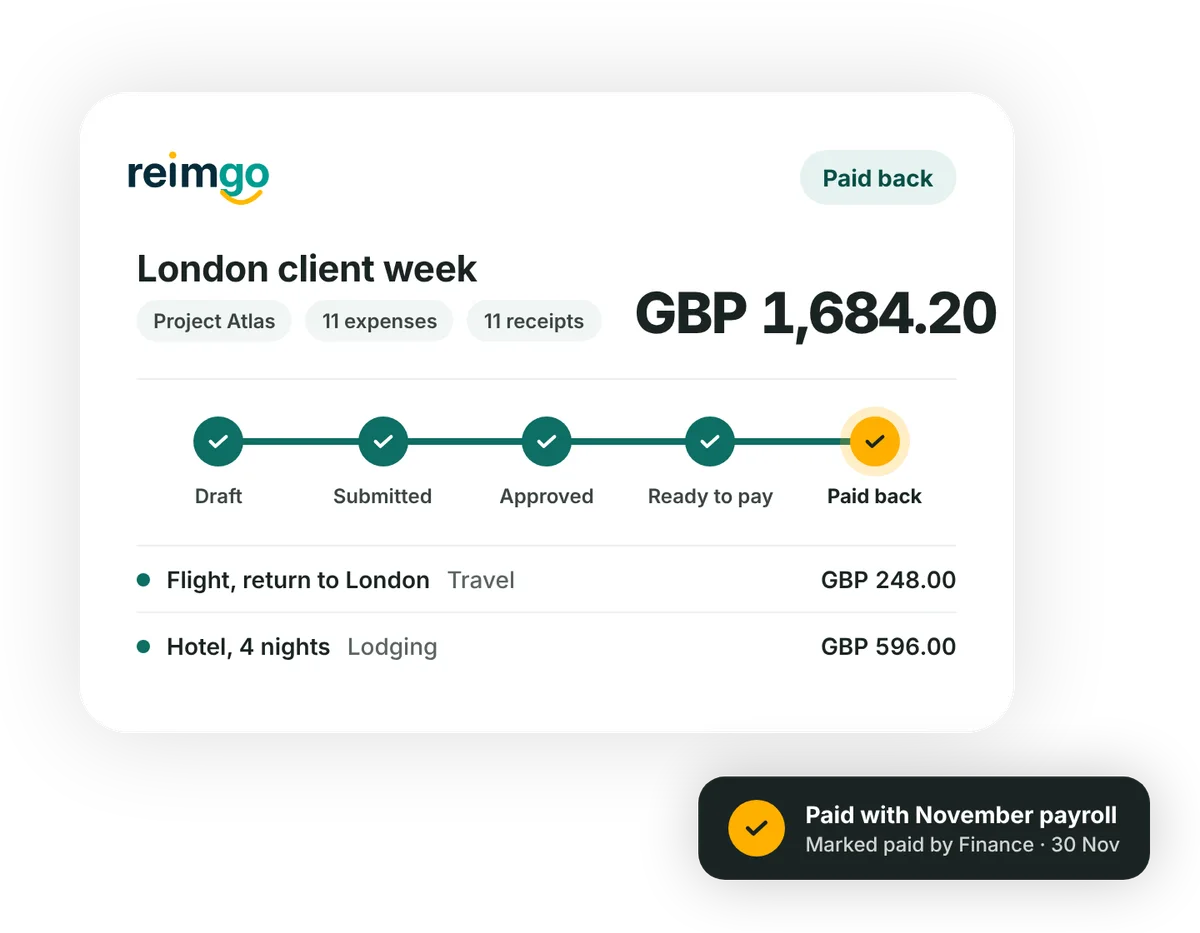
Keep expenses organized and claims moving
- Capture expenses as they happenSend a receipt through WhatsApp, forward it by email or capture it in Reimgo. Employees review the draft before submitting. Expenses can also be typed in by hand.
- Assign costs to the right workAdd a project, cost center or department so each expense is recorded against the work it supports. Your admin chooses which fields employees must complete.
- Bring related expenses into one reportGroup expenses for a trip, a client or a month. Review the totals, attached receipts and policy warnings before sending the report for approval.
- Follow progress through reimbursementSee whether a report is awaiting approval, needs a correction or is ready for payment. Once your business pays through payroll or its bank, finance marks the payment batch paid in Reimgo.
Track expenses the way your business works
Use your company's expense categories
Organize expenses with the categories and codes your admin maintains, so cost allocation stays consistent across employees, reports and accounting exports.
Split shared costs across projects
Allocate an expense by amount or percentage across up to 20 lines, each with its own project or cost center, while the one receipt stays attached.
Manage expenses across companies
Run several legal entities in one Reimgo account, each with its own country, currency and payroll file.
Record expenses in different currencies
Keep the original amount and its value in your company currency, converted at the rate on file for the expense date. A different rate can be entered with a reason, and the change is recorded.
Keep receipts and report details together
Give each report a title and an optional report type. Review category totals and the supporting receipts, then download a PDF for your records.
See what happened and who acted
The report history records each step with the person responsible and the time. Employees can follow progress without asking finance for every update.
Understand each expense report status
Reimgo tracks the reimbursement status. Your business makes the payment through its existing payroll or bank.
| Status | What it means | What happens next |
|---|---|---|
| Draft | The report has not been submitted. | The employee checks the expenses and makes any changes. |
| Submitted | The report is in the approval workflow. | The assigned approver reviews it. |
| Sent back | An approver has returned the report with a note. | The employee corrects it and resubmits. |
| Rejected | The report has been declined with a reason. | It stays available for the record. |
| Approved | Manager approval is complete. | Finance carries out its final review. |
| Ready to pay | Finance has approved the report for reimbursement. | Finance includes it in a payment batch. |
| Paid back | Finance has marked the payment batch paid. | The employee sees the recorded payment date and method. |
See the expenses behind a client project
A consultant spends a week with a client in London. She captures flights, hotel nights, meals and taxis as they happen, assigning each expense to the client project. At the end of the week she checks the details and submits one report. Her manager reviews the expenses and receipts, and finance prepares the approved report for the next payroll batch.
A project owner with the right access can then filter spending by that project and open the expenses behind the total, useful for checking project costs and preparing the supporting information for client invoicing.
Questions about expense tracking
What is employee expense tracking?
Recording work-related purchases and following each claim through submission, approval and reimbursement. Reimgo keeps the expense details, cost allocations, receipts and report status together.
Can we make a project or cost center mandatory?
Yes. Your admin can turn on fields such as projects, cost centers and departments, and decide which ones employees must complete.
Can one expense be split across two projects?
Yes. Employees can split an expense by amount or percentage across up to 20 lines, each with its own project or cost center. This allocates the cost inside Reimgo; invoicing a client happens in your own invoicing process.
Can employees see whether their expenses have been reimbursed?
Yes. Employees follow their report's status, and when finance marks the payment batch paid, the report shows the payment date and method.
Can an employee edit an expense after submitting it?
No. Once submitted it is locked. An approver can send the report back with a note so the employee can correct it and resubmit.
Does Reimgo support corporate card feeds?
No, not today. Reimgo is built for employee expense claims that are reimbursed to the employee.
Which currencies are supported?
Any currency on your company's list. Conversion uses the rate on file for the expense date. An employee can enter a different rate on their own expense with a written reason, and the change is recorded.
Give your team a clear view of every claim
Start your free trial, capture an expense and follow its report from submission to approval.